
Caring for Your Turntable

The short version
- Level, solid and away from the speakers. Never on top of a speaker or on the same shelf as one.
- Plug into PHONO and fasten the ground wire. Keep power cords away from the RCA cables.
- Leave the tonearm settings alone. We set them on our bench. Email us before changing anything.
- Brush the stylus back to front before each session, and never touch it with your finger.
- Moving it? Guard on, tonearm locked and tied, platter off and carried separately.
Moving it, even to another room? Read this first.
Why your turntable deserves a little care
A turntable is the most mechanical part of a hi-fi system. A diamond tip smaller than a grain of sand rides a groove you can barely see, and it turns the wiggles in that groove into a signal so small that it has to be amplified many times over before you hear a note. A motor, a belt or idler, a precision bearing and a finely balanced tonearm all have to do their jobs quietly for that to work.
That makes a turntable wonderfully rewarding, and a little fussy. Most of the turntable problems we see come down to a handful of things:
- a dirty or worn stylus
- poorly shielded interconnect cables bundled up with power cords, usually to keep things tidy
- a deck on a surface that isn’t level or solid
- a ground wire that’s loose or missing
- an old belt
- tonearm settings changed at home
- a stylus bumped by a hand, a cloth or a cat
- a move that wasn’t packed for
The cable problem we see most often
A phono signal is tiny, roughly a fiftieth of what a CD player puts out, and many vintage turntables left the factory with thin, lightly shielded cables. Tie those into a tidy bundle with the power cords behind your rack and they pick up hum and buzz from every one of them. Keep your turntable’s cables apart from power cords, and where they have to cross, cross them at a right angle.
Better still, upgrade them. Our Gold Series RCA Interconnects are built for exactly this. Their six-layer construction, with heavy braided copper and aluminum foil shielding, greatly reduces this kind of noise, and their slim gold-plated plugs are kind to fragile vintage RCA jacks. Many vintage decks have their cables hard-wired. For those, we can replace the originals with Gold Series on our bench and fit a proper spade to the ground wire, usually in about a week. This is local drop-off only; see fixed-cable upgrades.
Your turntable left our bench serviced, set up and tested to our turntable bench standard, so this guide is mostly about keeping it that way. Each section stands on its own. The checklist at the end is the short version.
Know your turntable
Belt, direct or idler drive?
A belt-drive deck turns its platter with a rubber belt looped around a small motor pulley, which keeps motor vibration away from the record. A direct-drive deck has the motor built right into the platter, with no belt to wear out. An idler-drive deck, common on older classics, uses a rubber-rimmed wheel between motor and platter. We service all three.
Manual, semi-automatic or fully automatic?
A manual deck leaves everything to you. A semi-automatic (auto-return) deck lifts the arm and returns it at the end of a side. A fully automatic deck also sets the arm down for you. With either automatic type, let the mechanism finish its cycle, and never push or hold the tonearm while it’s moving. Use the cue lever to raise and lower the arm by hand, rather than lifting it with your fingers.
The cartridge and the stylus
The cartridge is the small body at the end of the tonearm. The stylus is the diamond tip on a tiny arm called the cantilever, which sticks out underneath it. The stylus is the one part of a turntable designed to wear out with play. On most moving-magnet (MM) cartridges it slides out and can be replaced on its own. Moving-coil (MC) cartridges usually need the whole cartridge replaced or retipped, and they need an MC phono input or a step-up device to sound right.
The tonearm controls
- The counterweight on the back of the arm sets the tracking force: how hard the stylus presses into the groove.
- The anti-skate dial keeps the arm from pulling toward the center of the record.
- The cue lever raises and lowers the arm gently.
- The arm rest, often with a clip, holds the arm when you’re not playing.
We set the counterweight, anti-skate and arm height for your cartridge on our bench. Please leave them where they are. If something doesn’t sound right, email us before changing anything.
A built-in phono preamp?
Some turntables have one, with a switch on the back marked PHONO/LINE. Where you plug the turntable in depends on that switch (see Connecting it).
Got 78s?
Shellac 78 rpm records need a different, wider stylus. Playing them with a standard stylus wears both the record and the stylus. Ask us before you try.
Setting it up
Give it a level, solid home
A deck that isn’t level puts sideways force on the bearing and the tonearm, which can lead to distortion and skipping. Check it with a small spirit level on the plinth (not the platter), and adjust the feet if your deck has adjustable ones. The furniture matters too: a lightweight shelf that wobbles when someone walks by will make the stylus jump.
Keep it away from your speakers
Never set a turntable on top of a speaker, or on the same shelf as one or a subwoofer. Bass travels through the furniture into the stylus. At best that muddies the sound; at worst it becomes acoustic feedback, a rising howl as you turn up the volume. Put the speakers on their own stands or furniture, and keep the turntable a few feet away if you can.
Bouncy floor? Try a wall shelf
On suspended wooden floors, footsteps can make records skip. A purpose-built turntable shelf screwed into the wall studs takes the floor out of the picture completely. An isolation platform such as our IsoAcoustics zaZen I or zaZen II, or OREA isolation feet, also helps a great deal.
Not on top of another component
An amplifier or receiver underneath gives off heat and hum, and its vents need to stay clear.
Out of the sun, and away from heat and humidifiers
Direct sunlight yellows and warps dust covers and records. Heaters and humidifiers age the motor, the electronics and the rubber parts, just as they do every other component.
Leave the tonearm settings alone
Your turntable came to you balanced and set up for its cartridge. If you ever have to take the counterweight off (see Moving it), or something just doesn’t sound right, email us at sales@radique.com before you change anything. We’re happy to help, and a quick visit is usually all it takes.
Connecting it
A phono cartridge puts out roughly one-fiftieth to one-sixty-fifth of the voltage of a CD player or streamer. That’s why the connection between your turntable and your amplifier matters more than anywhere else in your system. Our Turntable Connectivity guide covers it in depth. Here’s the short version.
-
Switch everything off first. Your turntable and amplifier stay off until every cable is connected. Our Short Audio Tip #7 shows the routine.
-
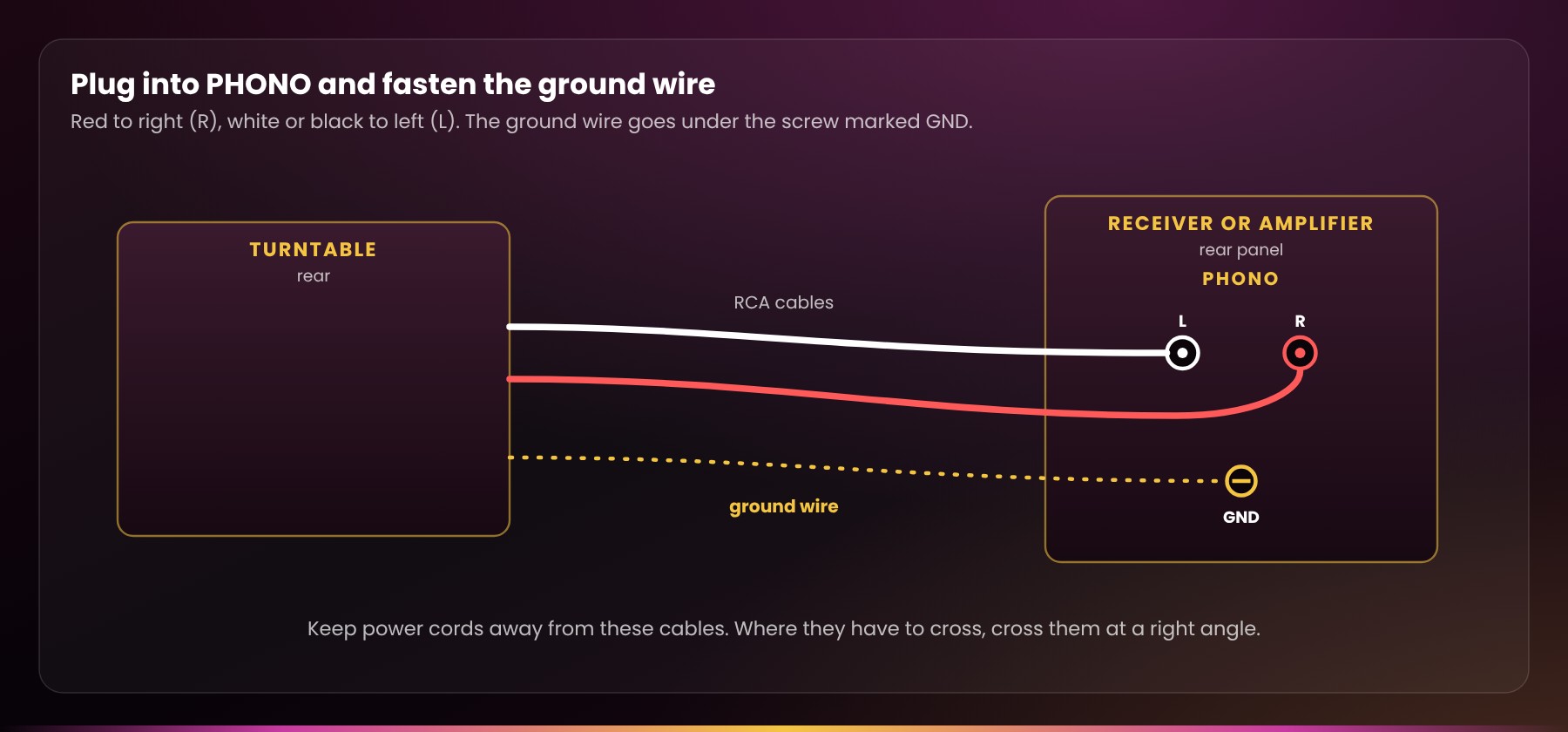
Plug into PHONO. Connect the turntable’s RCA cables to the input marked PHONO on your receiver, amplifier or phono preamp: red to right (R), white or black to left (L). Any other input will sound very quiet and thin. The one exception is a turntable with its own built-in preamp switched on: it goes to a LINE or AUX input instead.
-
Fasten the ground wire. The thin wire with a small fork on the end goes under the screw marked GND or GROUND, usually right beside the phono input. Tighten it by hand. A loose or missing ground wire is the most common cause of hum.
-
Keep power cords away from the RCA cables. Don’t bundle them together. Where they have to cross, cross them at a right angle.
-
Power up with the volume all the way down. Select PHONO, take off the stylus guard, release the tonearm from its rest, and bring the volume up gently once the record is playing.
Hearing hum?
A steady low hum is the classic sign of a grounding problem. Check that the ground wire is present and firmly attached at both ends, connected to a single ground point, and routed away from power transformers and power cords. Still humming? Email us. We’re happy to troubleshoot with you.
Better cables, quieter records
Our Gold Series RCA Interconnects use heavy braided-copper-and-foil shielding and slim, gold-plated plugs that are gentle on vintage RCA jacks. Turntables with factory hard-wired cables can be upgraded to Gold Series on our bench, local drop-off only. Details are in the Turntable Connectivity guide.
Stylus and record care
Clean the stylus, gently, back to front
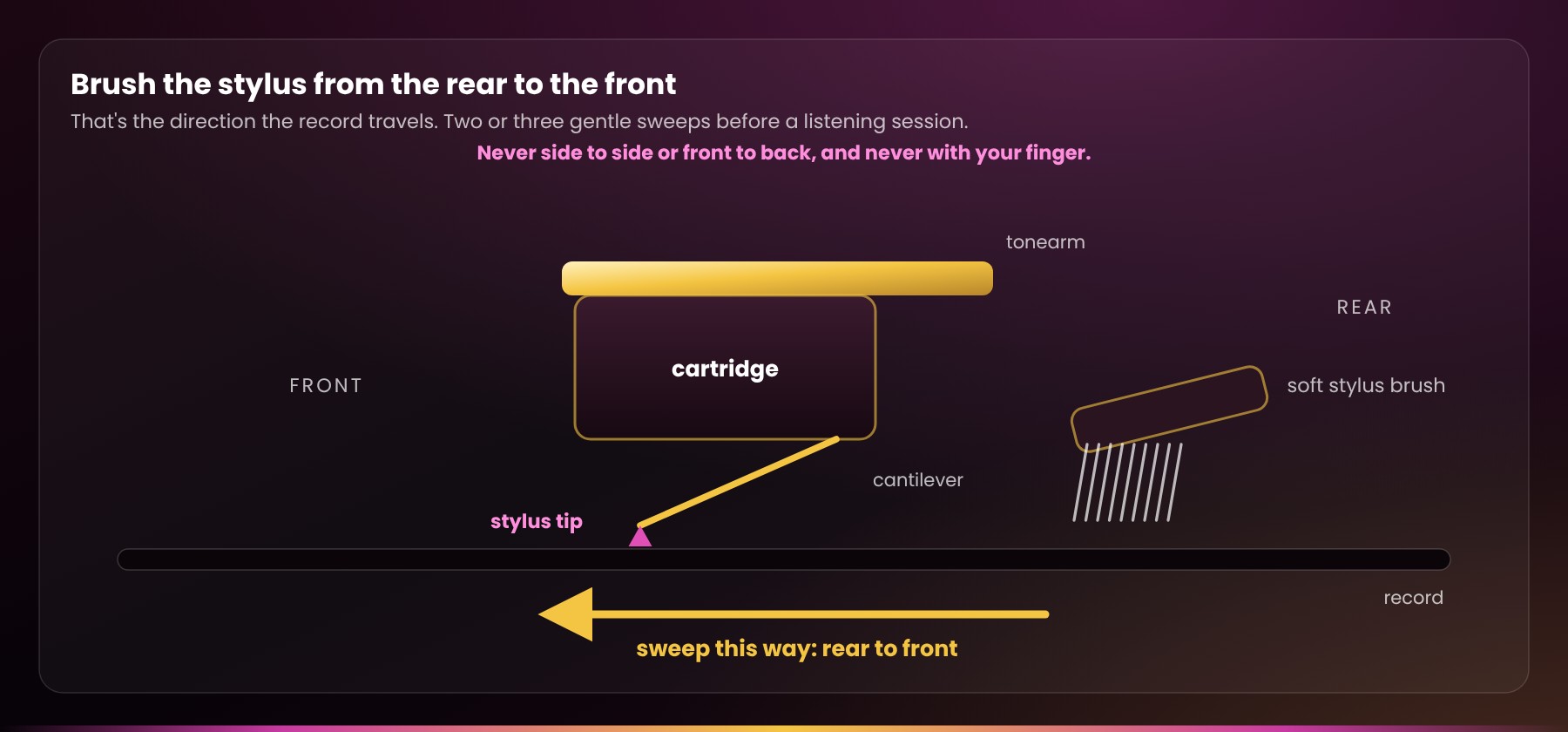
Dust and grime build up on the tip and make records sound fuzzy and noisy. Before a listening session, raise the arm with the cue lever and sweep a soft stylus brush over the tip two or three times, from the rear of the stylus to the front. That’s the direction the record travels. Never brush side to side or front to back, which can bend the cantilever, and never use your finger. If the tip is caked, a drop of stylus cleaning fluid on the brush (never on the cartridge itself) will lift it.
Know when to replace it
A stylus wears with every play, and a worn one doesn’t just sound worse: it damages your records. How long it lasts depends on its shape. A common guide is about 300 to 500 hours for conical and bonded elliptical tips, 500 to 800 for nude elliptical, and 800 to 1,000 or more for fine-line shapes. At an hour a day, that works out to every year or two. Listen for:
- harsh, spitty “s” sounds
- distortion on loud or crowded passages
- grey fluff collecting on the tip after every side
Those are your cue. Not sure what stylus you have, or how worn it is? Email us your turntable and cartridge model. We replace styli and cartridges on our bench.
About the stylus on your turntable
Many of the turntables we sell leave our bench with a brand-new stylus. When we keep a used one, it’s usually a high-end stylus that’s too good to throw away, and we only keep it if it has plenty of life left: a hundred hours of play or more.
Keep the guard handy
If your cartridge came with a clip-on stylus guard, put it on whenever you dust nearby, clean the room or move the turntable.
Handle records by the edges and the label
Never touch the playing surface: skin oils hold dust in the grooves. Give each record a few turns under a carbon-fibre record brush before you play it, and put it straight back in its sleeve when the side is done. Anti-static inner sleeves are worth the small cost, because old paper sleeves shed fibres and scuff the vinyl.
Store them upright, cool and out of the sun
Records stored flat or leaning at an angle slowly warp under their own weight, so stand them up like books, snug but not squeezed. Keep them out of direct sunlight and away from heaters. Archivists recommend a stable room temperature and humidity under 50%. A comfortable living room is fine; a hot car or a damp basement is not.
Everyday care and warning signs
Dust cover down when you’re not playing
Dust is a turntable’s slow enemy: it ends up on the stylus, in the grooves and in the bearing. Wipe the dust cover and plinth with a soft, dry microfibre cloth, keeping well clear of the stylus. Never spray cleaner on the turntable itself; put a little on the cloth if you need it.
Belts age even when you don’t play
On a belt-drive deck, the rubber belt slowly dries out and stretches whether you use the turntable or not. Pro-Ject, for one, suggests a new belt every year or two. Signs of a tired belt are music that sounds slightly slow, a wavering pitch on held piano notes or voices, or a platter slow to come up to speed. If you ever handle the belt, keep it off oily fingers. Belts are a quick, inexpensive fix on our bench.
Check the speed now and then
Many decks have strobe dots on the platter rim, or a pitch control. If music suddenly sounds off-key, the speed is the first thing to look at.
Switch it off when you’re done
An idle motor and power supply still wear, and auto-return decks rest better with the arm parked in its clip.
Sounds that mean “stop and look”
- Skipping or a repeating groove: check that the deck is level and not shaking, that the stylus is clean, and that the record isn’t warped or dirty. If it keeps happening on clean, flat records, email us.
- Harsh, spitty or distorted sound: usually a dirty stylus, sometimes a worn one (see Stylus and record care).
- Wavering pitch, or a deck that runs slow: often the belt.
- A steady hum: almost always the ground wire (see Connecting it).
- One channel quiet or dead: a loose cable, or a fault in the cartridge or tonearm wiring. Try swapping left and right at the amplifier to see whether the problem follows the cable.
- A rising howl as you turn it up: acoustic feedback from the speakers (see Setting it up).
If a problem keeps coming back, please don’t open up the turntable or adjust the tonearm yourself. Email us first. That’s what our bench is for.
Moving it
The drive home from our shop, a move across town, even shifting it to another room: a turntable is most at risk whenever it’s carried. It’s also why we don’t ship used turntables. The risk of damage in transit is just too high. The one exception is a brand-new turntable still sealed in its maker’s packaging, like our Technics SL-1200MK7.
Before you lift it
-
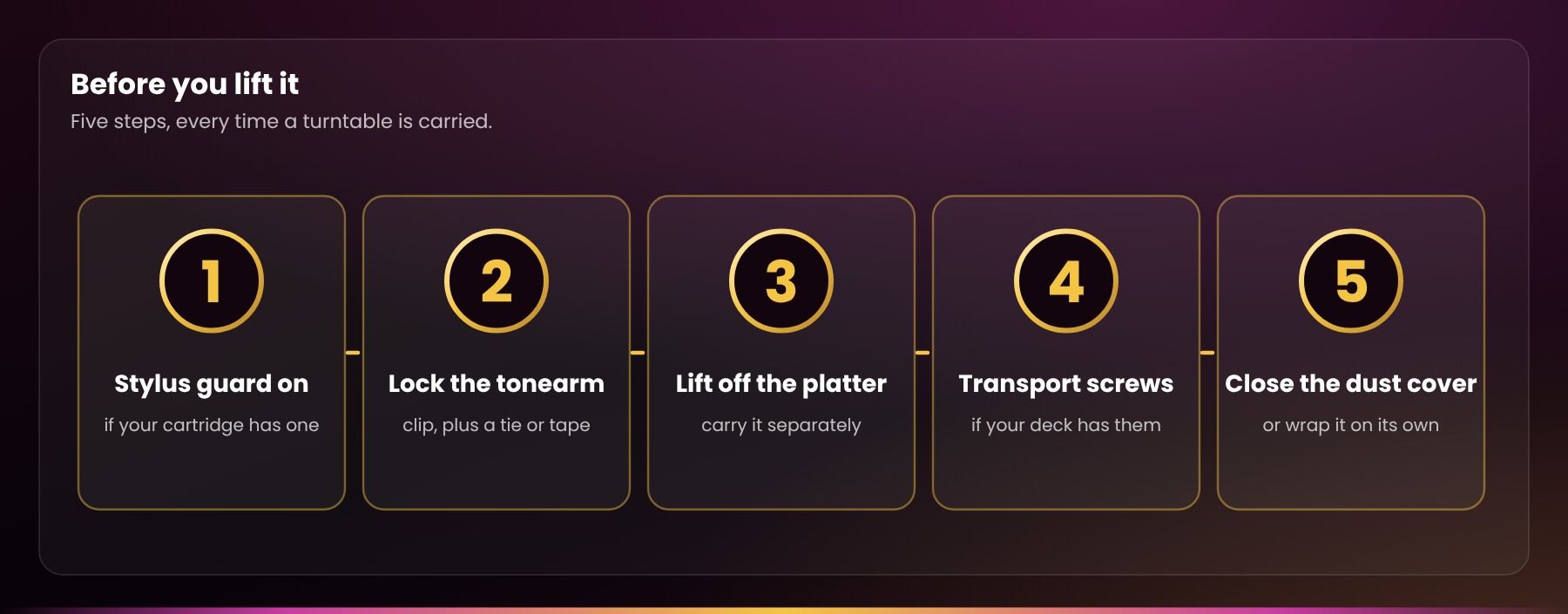
Stylus guard on, if your cartridge has one.
-
Lock the tonearm in its rest with the clip, and add a twist tie or a strip of low-tack painter’s tape around the arm and the rest, so it can’t swing free.
-
Lift off the platter (and on belt-drive decks, slip off the belt) and carry it separately. Many makers recommend this for anything farther than across the room.
-
Transport screws: some decks with a floating (suspended) sub-chassis have screws to lock it for travel. If yours does, tighten them for the move and loosen them again before you play.
-
Close the dust cover, or remove it and wrap it on its own if the hinges are loose.
On the road, keep the turntable flat and level, cushioned on a seat or the floor of the car, not loose in the trunk. Keep it with you in the cabin in winter, too: cold makes rubber belts and plastic covers brittle. When you arrive, let it warm up to room temperature for a few hours before you plug it in.
The counterweight
Leave it on if you can. If it’s loose enough to slide off, take it off and wrap it, but know that putting it back means setting the tracking force again. Email us, or bring the deck in, and we’ll set it up for you.
Keep the original box and packing if you have them. Nothing protects a turntable as well as the packaging it was designed for.
Service, restoration and your warranty
Your warranty
Used and vintage turntables from us carry our 90-day Bumper-to-Bumper Warranty: if it fails in normal use, we repair or replace it at our expense and start you on a fresh 90 days. Normal use means everyday listening, not a hot-plug mishap, a coffee incident or an encounter with gravity. The habits in this guide protect your turntable and your warranty alike.
Picking up in person?
Let us play a record for you before it goes home, so you see and hear it working. Bought in person or on Kijiji, Facebook Marketplace or Canuck Audio Mart? Send one email to sales@radique.com to register your purchase. Orders placed on radique.com are already on file.
When it needs more than care
Our Turntable Restoration & Custom Builds service brings belt, direct and idler drive decks back to full working order. It covers:
- platter bearing cleaned and lubricated
- speed set at 33⅓ and 45 rpm
- tonearm balanced, with tracking force and anti-skate set
- cartridge aligned, and stylus or cartridge replaced
- new belts
- tonearm rebuilds and cable repairs
- Gold Series cable upgrades for decks with fixed cables
- dust cover restoration
- custom paint
Every serviced turntable is tested again by a different tech before it goes home. Restoration starts with a bench fee at intake, applied to your final bill if you go ahead. Drop-off and pickup are at our Kanata location.
Questions first?
Email us the make and model, and a photo if something looks wrong. We’d much rather hear from you before a setting gets changed than after.
Watch and learn
Prefer to watch? Mark and La-Donna share quick tips on the Radique Audio YouTube channel.
- What Order Do You Turn On Stereo Equipment? (Audio Tip #7): connect with everything off, use a switched power bar, and power up in the right order.
- Turntable Connectivity guide (PDF): cables, grounding and hum, ready to print and keep beside your turntable.
Subscribe for new Audio Tips as they come out.
Audio Tip #7: what order do you turn on stereo equipment?
Turntable questions we hear most
Short answers, each one taken from the guide above.
How often should I replace my turntable stylus?
A stylus wears with every play, and a worn one doesn’t just sound worse: it damages your records. How long it lasts depends on its shape. A common guide is about 300 to 500 hours for conical and bonded elliptical tips, 500 to 800 for nude elliptical, and 800 to 1,000 or more for fine-line shapes. At an hour a day, that works out to every year or two. Listen for harsh, spitty “s” sounds, distortion on loud or crowded passages, and grey fluff collecting on the tip after every side.
Why is my turntable humming?
A steady low hum is the classic sign of a grounding problem. Check that the ground wire is present and firmly attached at both ends, connected to a single ground point, and routed away from power transformers and power cords. A loose or missing ground wire is the most common cause of hum. Still humming? Email us. We’re happy to troubleshoot with you.
Can I put my turntable on top of my speakers?
No. Never set a turntable on top of a speaker, or on the same shelf as one or a subwoofer. Bass travels through the furniture into the stylus. At best that muddies the sound; at worst it becomes acoustic feedback, a rising howl as you turn up the volume. Put the speakers on their own stands or furniture, and keep the turntable a few feet away if you can.
Which way do I clean a stylus?
From the rear of the stylus to the front. That’s the direction the record travels. Raise the arm with the cue lever and sweep a soft stylus brush over the tip two or three times. Never brush side to side or front to back, which can bend the cantilever, and never use your finger.
Should I take the platter off to move a turntable?
Yes. Lift off the platter (and on belt-drive decks, slip off the belt) and carry it separately. Many makers recommend this for anything farther than across the room. Before you lift the deck, put the stylus guard on, if your cartridge has one, and lock the tonearm in its rest with the clip.
Do you ship used turntables?
No. A turntable is most at risk whenever it’s carried, and that’s why we don’t ship used turntables. The risk of damage in transit is just too high. The one exception is a brand-new turntable still sealed in its maker’s packaging, like our Technics SL-1200MK7.
What warranty comes with a used turntable from Radique?
Used and vintage turntables from us carry our 90-day Bumper-to-Bumper Warranty: if it fails in normal use, we repair or replace it at our expense and start you on a fresh 90 days. Normal use means everyday listening, not a hot-plug mishap, a coffee incident or an encounter with gravity.
Quick checklist
If you only read one part of this guide, read this one.
- Level, solid and away from the speakers. Never on top of a speaker or on the same shelf as one.
- Plug into PHONO and fasten the ground wire. Keep power cords away from the RCA cables.
- Connect with everything off. Power up with the volume all the way down.
- Leave the tonearm settings alone. We set them on our bench. Email us before changing anything.
- Brush the stylus back to front before each session, and never touch it with your finger.
- Brush each record before you play it, handle it by the edges and label, and store records upright, away from heat and sun.
- Dust cover down when you’re not playing, and stylus guard on when you clean nearby or move it.
- Replace the stylus every few hundred hours of play, about every year or two at an hour a day, or sooner if records start to sound harsh.
- Belt-drive deck? A new belt every couple of years, or as soon as the pitch wavers.
- Keep it away from heaters, humidifiers and direct sun.
- Moving it? Guard on, tonearm locked and tied, platter off and carried separately.
Questions, or something not sounding quite right?
Email us at sales@radique.com. We’d much rather hear from you early.
More from Radique: turntable connectivity · turntable restoration · caring for your subwoofer · Warranty FAQ