RA-Twin II User Manual
← Back to the RA-Twin II product page
RA-Twin II Bluetooth Transmitter & ReceiverTiny but mighty: everything you need to set up, pair and get the most from your RA-Twin II
RA-Twin II at a glance
- Two-way Bluetooth 5.4: RX mode plays your phone through a non-Bluetooth amplifier, vintage receiver or car stereo; TX mode sends sound from non-Bluetooth gear (a vintage amp, a TV) to Bluetooth headphones or speakers.
- Mobile mode, a pocket MP3 player: load a microSD card (up to 64 GB) and leave the phone at home.
- About 2 hours to charge over USB-C for up to 10 hours of use. Range up to 10 m (33 ft) with line of sight.
- 60 × 25 × 13 mm and 15 g, with a 1-year Radique Audio warranty and Ottawa-based support.
Which mode do I need?
Three ways to use it. For RX or TX, ask one question: which device has Bluetooth?
RX · Receive Most popular
Your phone or tablet has Bluetooth; your amplifier, vintage receiver or car stereo doesn’t. Plug the RA-Twin II into the system’s audio input and stream from your phone. RX setup
TX · Transmit
Your stereo, amp or TV has no Bluetooth; your headphones or speaker do. Plug the RA-Twin II into the source’s audio output and it sends the sound to your Bluetooth headphones or speaker. TX setup
Mobile · microSD
No phone, no stereo: just you and your headphones. Load a microSD card with MP3s and the RA-Twin II becomes a tiny music player for jogging, skiing or travel. Mobile mode
1 · Introduction
Thank you for choosing the Radique Audio RA-Twin II Bluetooth Transmitter & Receiver. It wirelessly transmits audio from non-Bluetooth devices to Bluetooth speakers or headphones, and receives audio from Bluetooth devices for non-Bluetooth amplifiers and audio systems. Load a microSD (TF) card with your favourite music, podcasts or audiobooks and it also becomes an extremely compact music player, ideal for jogging, skiing, or any time you’d rather leave the phone at home.
Part of our Tiny but Mighty RA-series, the RA-Twin II brings audiophile-grade performance without the audiophile price. We design products that sound great, last long, and keep vintage audio out of landfills by giving equipment a second life. With low-latency, high-quality transmission, it’s at home in the living room, the car, on a plane, or on the go.
2 · What’s in the box
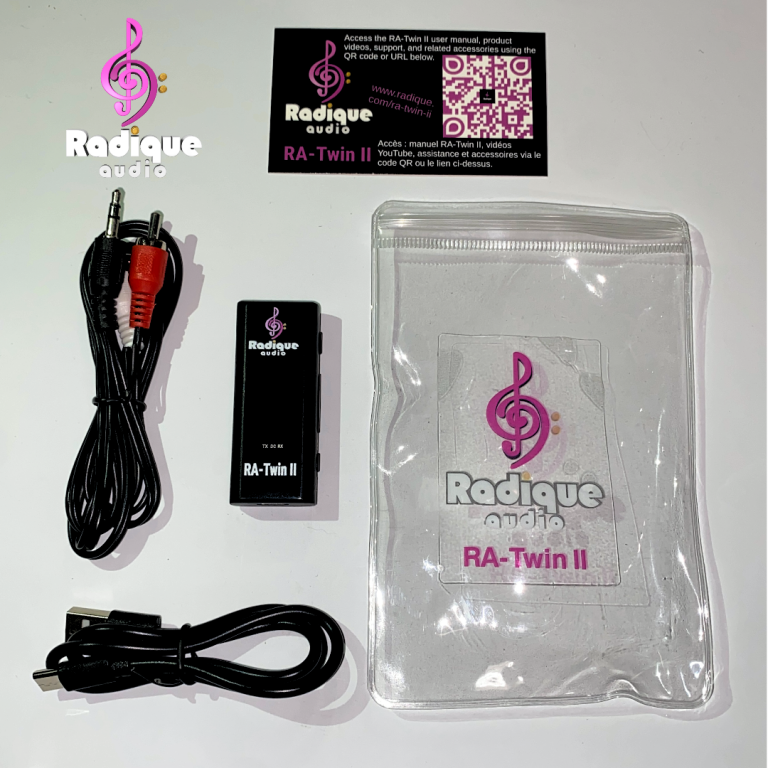
- RA-Twin II Bluetooth Transmitter / Receiver
- Insert card with a QR code linking to this manual and our YouTube channel
- USB-C charging cable
- Basic dual RCA to 3.5 mm cable
Want better sound and shielding? Discounted upgrades to our Black Series and Gold Series cables are available, or get the Gold Series TX bundle or Gold Series RX bundle.
3 · Safety instructions
- Keep it dry. The RA-Twin II is not waterproof; keep it away from water, rain and excessive moisture.
- Keep it cool. Keep it away from radiators, stoves and direct sunlight.
- Charge it safely. Use the supplied USB-C cable and a standard 5 V DC USB power source only.
- Handle with care. Dropping it or hard knocks can damage the internal components.
- Clean it dry. Use a soft, dry cloth, never liquid or aerosol cleaners.
- Don’t open it. Disassembling, repairing or modifying the device voids the warranty and risks electric shock or fire.
- Radio frequency: like all Bluetooth devices it uses radio signals; turn it off where wireless devices are prohibited.
- Battery disposal: it contains a rechargeable lithium battery; dispose of it under your local e-waste and battery rules.
Always power off first
Before you plug the RA-Twin II into your source or playback device, turn off both components. It reduces the risk of damaging either device with static discharge.
Protect your ears
Listening at high volume for long periods can cause hearing damage. Start low and raise the volume gradually.
4 · Interface diagram
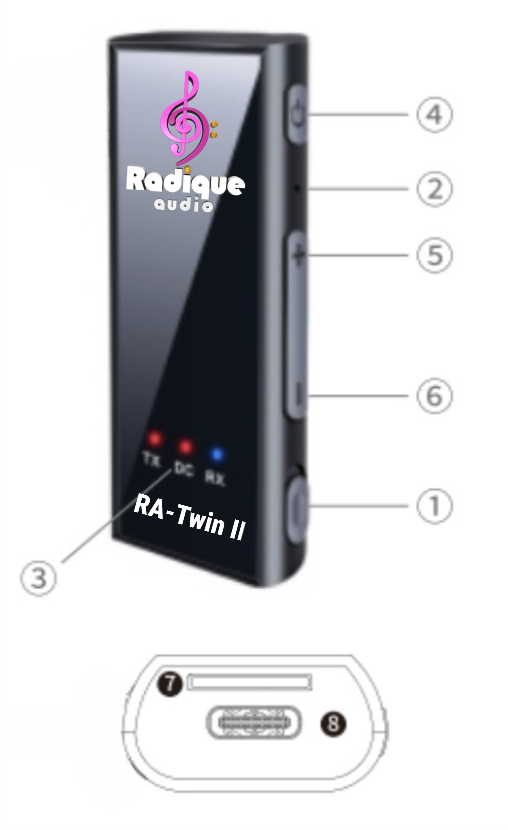
| # | Control |
|---|---|
| 1 | TX/RX switch: TX to transmit, RX to receive |
| 2 | Microphone (hands-free calls in RX mode) |
| 3 | Status indicators: TX, DC (charging) and RX |
| 4 | Power button |
| 5 | Previous track · long press for volume up |
| 6 | Next track · long press for volume down |
| 7 | microSD (TF) card slot |
| 8 | USB-C charging port |
5 · Getting started
Charge it
Connect the small end of the USB-C cable to the RA-Twin II and the other end to a wall adapter, computer USB port or power bank (or our RA-USB multi-port charger, which can plug into the AC outlet on the back of many vintage amps). The DC light glows solid red while charging and turns off when it’s full: about 2 hours for up to 10 hours of use.
Power on and off
On: hold the Power button for 3 seconds until the light flashes. Off: hold it for 3 seconds until the light goes out. It also switches itself off after 10 minutes without an active source.
Choose a mode
Slide the switch to RX (receive) or TX (transmit). For Mobile (microSD) mode, hold the previous and next (+/−) buttons together for 3 seconds; the switch can be in either position.
6 · RX mode: receive Phone, tablet or other Bluetooth source → non-Bluetooth amplifier, receiver or car stereo
Step 1 · Connect
- Power off your amplifier or system before plugging in.
- Plug the RCA to 3.5 mm cable into the RA-Twin II and your system’s audio input.
- Other options: a ¼” to ⅛” (6.35 mm to 3.5 mm) Gold Series TRS cable for vintage gear (sold separately), or a 3.5 mm to 3.5 mm cable into a 3.5 mm AUX input (not included).
- Hold the Power button to switch on and slide the switch to RX. The RX light flashes.
Step 2 · Pair your phone
- Turn on Bluetooth on your phone or source device.
- Search for “RA-Twin II” and pair.
- The RX light stays on when connected. Enjoy music straight from your phone.
Good to know
- For hands-free calls, mount the RA-Twin II near your mouth, on the dashboard or sun visor.
- Click the Power button to answer or hang up; long press to reject a call.
- If pairing fails, turn Bluetooth off on your phone, restart the RA-Twin II and try again.
7 · TX mode: transmit Non-Bluetooth source (amplifier, TV, etc.) → Bluetooth headphones or speakers
Step 1 · Connect
- Power off your source device before plugging in.
- Plug the dual RCA to 3.5 mm cable into the RA-Twin II and your source’s audio output.
- Other options: a ¼” to ⅛” (6.35 mm to 3.5 mm) TRS cable into an amplifier’s headphone jack (sold separately), or a 3.5 mm to 3.5 mm cable into a 3.5 mm output (not included).
- Power on the RA-Twin II and slide the switch to TX. The TX light flashes red.
Step 2 · Pair
- Put your headphones or speaker in pairing mode.
- Wait for automatic pairing. The TX light stays on once paired.
- Play music on your source; it’s sent to your headphones or speaker.
Good to know
- Power button: click to pause or play, double-click to search again, long press for on/off.
- If pairing fails, turn both devices off and try again.
- With a TV, make sure you’re plugged into its audio output, not an input.
8 · Mobile mode (microSD card)
A tiny standalone music player: no phone required.
How it works
- Hold the previous and next buttons together to switch to Mobile (microSD) mode. You’ll hear “SDCard Mode”.
- Switch in RX: music plays through the 3.5 mm jack.
- Switch in TX: music streams to your Bluetooth headphones or speaker.
- Your place in a track is remembered unless the battery runs flat.
Card and file limits
- Cards up to 64 GB, enough for about 15,000 songs.
- MP3 files only, including most podcasts and audiobooks.
- Put files in the card’s main (root) folder; files in subfolders won’t play.
- Variable-bitrate MP3s and files with large embedded artwork aren’t supported.
9 · Controls & voice prompts
| Power button | |
|---|---|
| Play / pause | Short press while music plays |
| Re-pair a lost connection | Double-click (TX mode) |
| Switch between paired devices | Long press |
| Answer a call | Short press while it rings |
| Reject a call | Long press while it rings |
| Power on / off | Hold 3 seconds |
What you’ll hear
The RA-Twin II announces its status through your connected headphones, speaker or system:
- “Power On” and “Power Off”
- “Low Battery”
- “Connected” and “Disconnected”
- “SDCard Mode” (Mobile mode)
- “Maximum Volume”: with some connections, slight distortion can creep in at maximum, so back off by at least one click.
10 · Specifications
| RA-Twin II | |
|---|---|
| Bluetooth | V5.4 EDR · A2DP, HSP, AVRCP profiles |
| Range | Up to 10 m (33 ft) with line of sight |
| Modes | RX (receive) · TX (transmit) · Mobile (microSD player) |
| Charging | 5 V / 1 A (5 W) over USB-C (cable included) · about 2 h to full |
| Battery life | Up to 10 hours |
| microSD (TF) card | Up to 64 GB (about 15,000 songs) · MP3 only, root folder · no variable-bitrate MP3s or large embedded artwork |
| Dimensions | 60 × 25 × 13 mm (2.36 × 0.98 × 0.51 in) |
| Weight | 15 g (0.53 oz) |
11 · Troubleshooting
These quick checks solve the most common situations. Still stuck? Email sales@radique.com or call 613-416-9995.
Should I use RX or TX mode?
Use RX when you want to stream from your phone or tablet to an amplifier, receiver or car stereo that has no Bluetooth; it’s the mode most customers use. Use TX when your source (a stereo, amplifier or TV) has no Bluetooth and you want to listen on Bluetooth headphones or a Bluetooth speaker. For music on the go without a phone, use Mobile mode with a microSD card.
My RA-Twin II won’t power on
Charge it for at least 30 minutes, then hold the Power button for 3 seconds.
There’s no sound
Check the cable connections and that the switch is in the right mode (TX or RX) for your setup. Make sure the volume is up on both devices.
The audio drops out
Move the devices closer together with fewer obstacles between them, keep away from sources of wireless interference, and try pairing again.
RX mode: my phone won’t pair
Make sure Bluetooth is on, “forget” the RA-Twin II in your phone’s Bluetooth settings and pair it again, then restart both devices if needed.
RX mode: my amp plays noise or distortion after I stop streaming
After 10 minutes without a connection the RA-Twin II switches itself off, and if the amplifier is still on and set to that input, the cable can act like an antenna and the amp plays the interference it picks up. Turn the amplifier off or switch it to another source when you’re done streaming, or upgrade to our Gold Series 3.5 mm to dual RCA cable, whose heavier shielding stops the noise even after the RA-Twin II switches off.
RX mode: I can’t hear calls
Check your phone’s audio routing, mount the RA-Twin II so the microphone points toward your mouth, and set your playback system to the correct input and volume.
TX mode: my headphones or speaker won’t pair
Make sure they’re in pairing mode and not connected to another device. Double-click the Power button to search again, restart both devices, and confirm the RA-Twin II is plugged into your source’s audio output.
Mobile mode: songs won’t play from the microSD card
Push the card fully into the slot, put the files in the card’s main (root) folder rather than subfolders, and use MP3 files (not variable-bitrate, and without large embedded artwork).
Mobile mode: tracks skip or restart
Avoid short taps on the +/− buttons, which change tracks. Use your headphones’ volume controls instead.
12 · Warranty & support 1-year Radique Audio warranty
- Radique Audio warrants the RA-Twin II against defects for 1 year from the date of purchase.
- Catastrophic misuse isn’t covered (“feeding it to your dog”, for example), and neither is opening or modifying the device.
- Keep your receipt; it’s your proof of purchase.
Regulatory: complies with FCC and Industry Canada RSS standards; operation is subject to the condition that it not cause harmful interference. Dispose of it responsibly under your local e-waste rules (WEEE symbol).
Ottawa-based support
No outsourced call centre: you reach the Radique team directly.
Enjoy your RA-Twin II
Charge it, pick RX, TX or Mobile mode, and play. Questions about your setup, or which cable suits your gear? We’re happy to help.
More Radique Audio guides: RA-Mini manual · banana plug installation · turntable connectivity