
Caring for Your Subwoofer

The short version
- Never connect it hot. Switch everything off before you plug or unplug any cable.
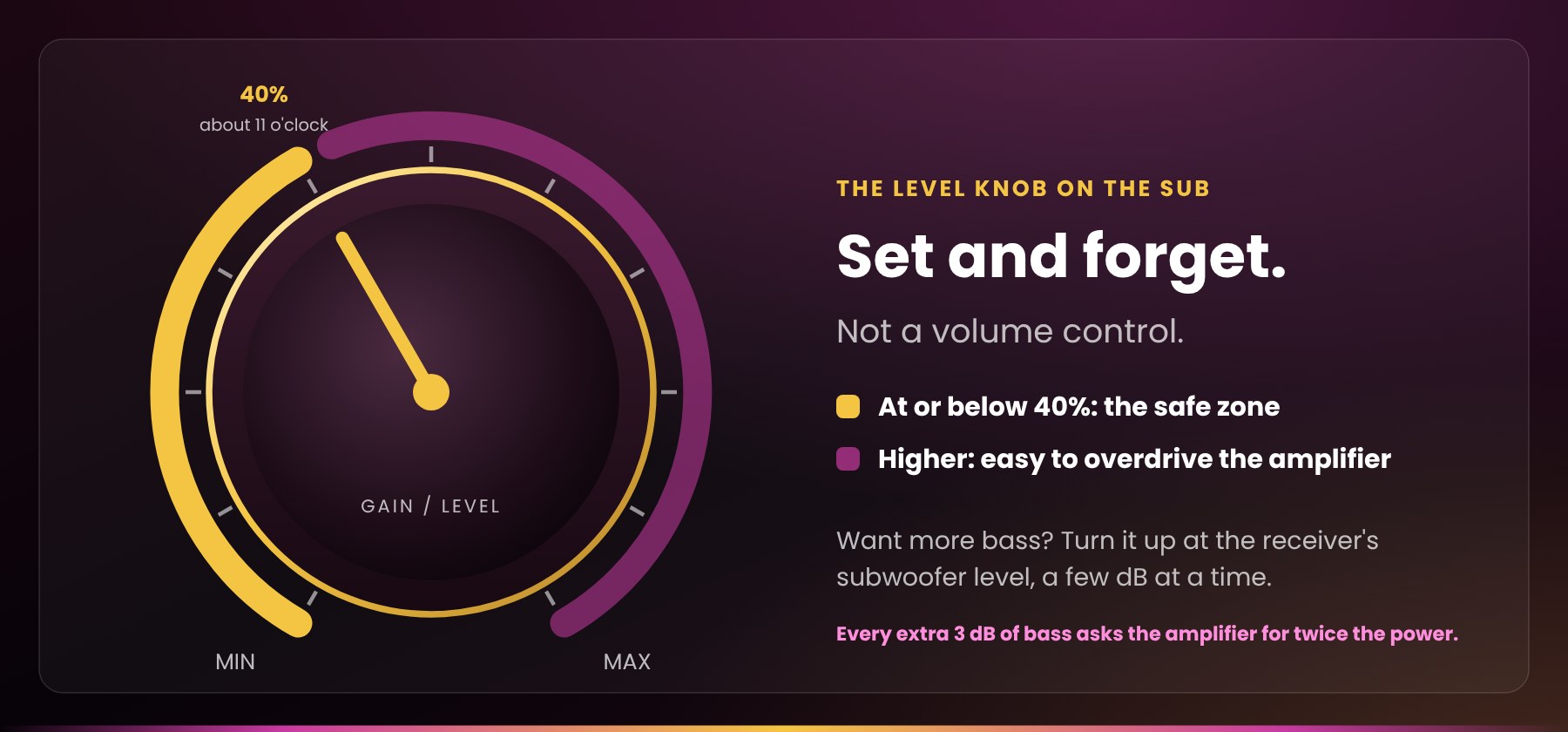
- Keep the gain knob at or below about 40% (roughly 11 o’clock). Get extra level from your receiver’s subwoofer setting instead.
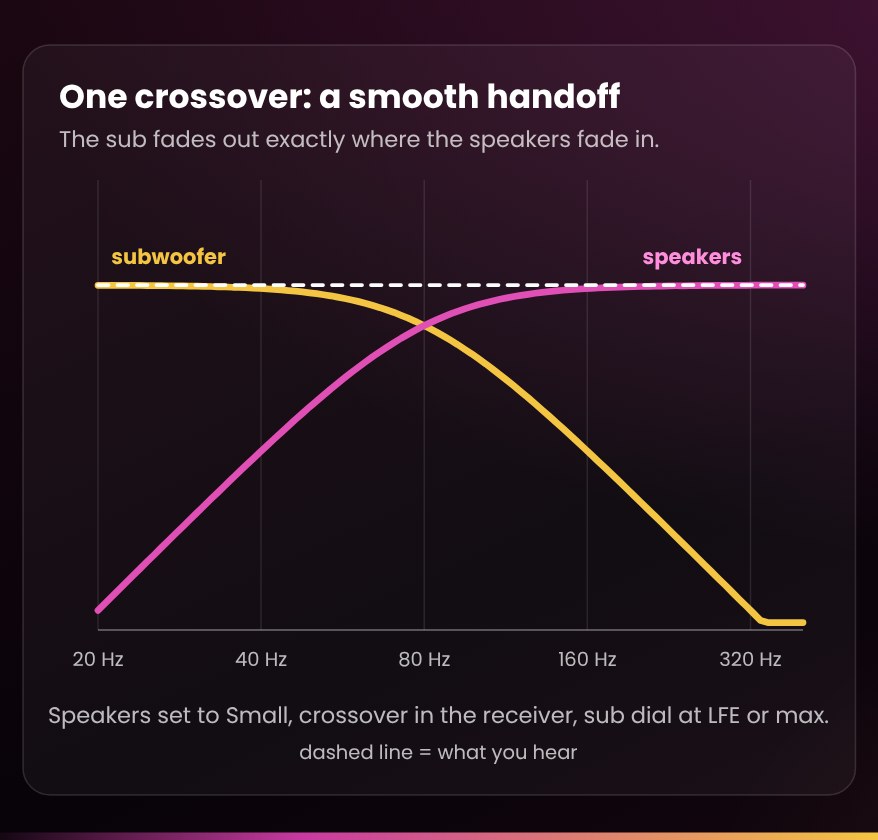
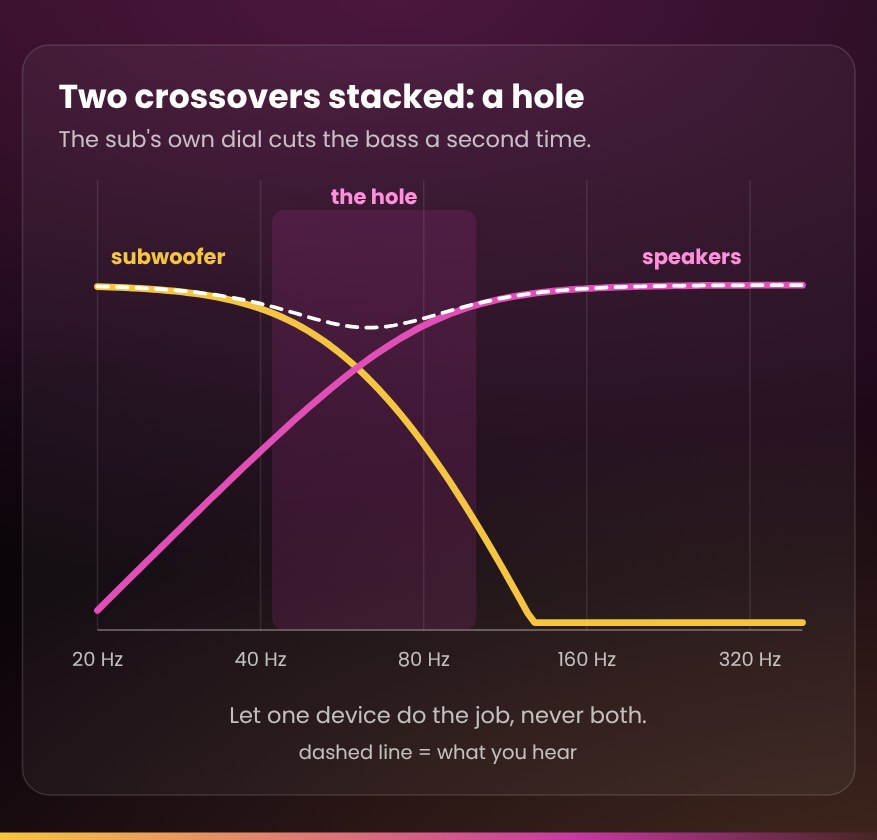
- Let one device handle the crossover. Two crossovers stacked on top of each other leave a hole in the bass.
- Use a well-shielded subwoofer cable, kept away from power cords.
- Switch it fully off when you’ll be away for more than a few days, and when the lights dim or a storm rolls in.
Used subwoofers carry their own warranty: here is how it works, and why.
Why your subwoofer deserves a little care
Your subwoofer is the hardest-working, most fragile and most misunderstood part of a home theatre, and in our experience it is the component that fails most often. It packs a powerful amplifier, its own power supply and a long-throw driver into one box, moves more air than anything else in the system, and usually sits on the floor in a corner, on the same outlet as everything else.
Most of the subwoofer failures we see come down to a handful of avoidable things: a cable connected with the power on, a power spike or brownout, a level knob left near maximum, or a sub asked to fill a room much bigger than it was built for. This guide covers how to avoid each one, and how to get deeper, cleaner, better-blended bass along the way.
Each section stands on its own. The checklist at the end is the short version.
Know your subwoofer
Is my sub powered or passive?
Almost every home-theatre subwoofer made today is powered (active): the driver, its own amplifier and its controls live in one cabinet, and it takes a low-level signal from your receiver over an RCA cable. A passive subwoofer is just a driver in a box. It needs a separate amplifier, or the dedicated subwoofer speaker terminals on a home-theatre-in-a-box receiver it was designed for. If your sub has a power cord and a volume knob on the back, it is powered.
Which part usually fails?
On a powered sub it is almost always the built-in amplifier (the “plate amp” on the back panel), not the speaker cone. That amplifier works hard, makes heat, and is the part most exposed to power spikes, brownouts and connections made with the power on. Most of the habits in this guide exist to protect it.
Sealed or ported?
A sealed (closed) sub has no opening in the cabinet. It tends to sound tight and controlled and is forgiving about placement. A ported sub has a round or slot-shaped vent that lets it play deeper and louder for its size. Never block the port, and give a rear port a few inches of breathing room from the wall; your owner’s manual gives the exact distance.
Front-firing or down-firing?
Look for the cone. A front-firing sub points it into the room; a down-firing sub points it at the floor, a short distance above it. Each has placement pitfalls, covered under Placement and the room.
Power and protection
Never connect or disconnect anything with the power on
Plugging a cable into a live subwoofer or receiver sends a loud thump through the system that can damage the amplifier or the driver. Turn everything off first, ideally with the switch on your power bar, make every connection, then power up. Manufacturers say the same: Sunfire’s manual tells owners to turn off every component, the subwoofer included, before connecting or disconnecting cables. Our Short Audio Tip #7 shows the routine.
On last, off first
Turn on your sources, then the receiver or preamp, then the subwoofer. Turn off in reverse, with the subwoofer first. That keeps the switch-on and switch-off thumps of the other components out of your sub. If your sub is set to Auto, it follows this order by itself.
Audio Tip #7: what order do you turn on stereo equipment?
Use a quality surge protector, and know what it doesn’t do
Plug the subwoofer into the same surge-protected power bar as your receiver; one shared bar also helps prevent ground-loop hum. A surge protector absorbs spikes, including the surge that can hit when power returns after an outage or brownout. It does not protect against the brownout itself: a typical surge protector can’t protect against outages, blackouts or brownouts. When the lights dim or a storm rolls in, switch the system off at the bar or unplug it. If brownouts are common where you live, look for a power conditioner with automatic low- and high-voltage shutdown. Nothing you plug in protects against a close lightning strike, so unplug during thunderstorms.
Protecting the whole system?
Our Ultralink HDC150 power conditioner does a power bar’s surge job and more, for everything in the rack, not just the sub:
- 3,500 joules of surge protection, plus protection on the cable, satellite and network lines that most power bars leave open
- EMI/RFI filtering, up to 58 dB, to take noise off the AC line before it reaches your gear
- eight outlets in isolated, individually filtered pairs, so a streaming box can’t push noise into your amplifier; four are switched, so the system can power up and down together
- a front-panel display of the incoming line voltage, so you can actually see a brownout as it happens
For a single wall outlet, our Ultralink Noir ULN700XR wall-mount surge protector is the simple, compact option.
Auto, On or Trigger?
Most powered subs offer some of these:
- Auto (signal sensing): the sub wakes when it detects a signal and drops to standby after a quiet spell, about 20 minutes on many models. It’s convenient and saves power. Its weakness is that quiet music may not wake it, and after a long quiet passage it can miss the start of an explosion. A slightly stronger signal from the receiver, or a Y-splitter on a sub with left and right inputs, usually cures that.
- Trigger (12 V): your receiver switches the sub on and off with a small cable. It’s the most reliable option when both have the jack.
- On: always on. Use it only if Auto misbehaves, and then switch the sub off at the power bar when you’re done.
Going away for a few days? Switch it fully off
Standby still draws power, and it leaves the amplifier connected to every spike on the line. Velodyne, for example, recommends setting the power switch to off if the sub will sit unused for more than five days. Switching off at the sub or the power bar costs nothing and takes the most failure-prone part of your system out of harm’s way.
Connecting it
LFE input or left and right inputs?
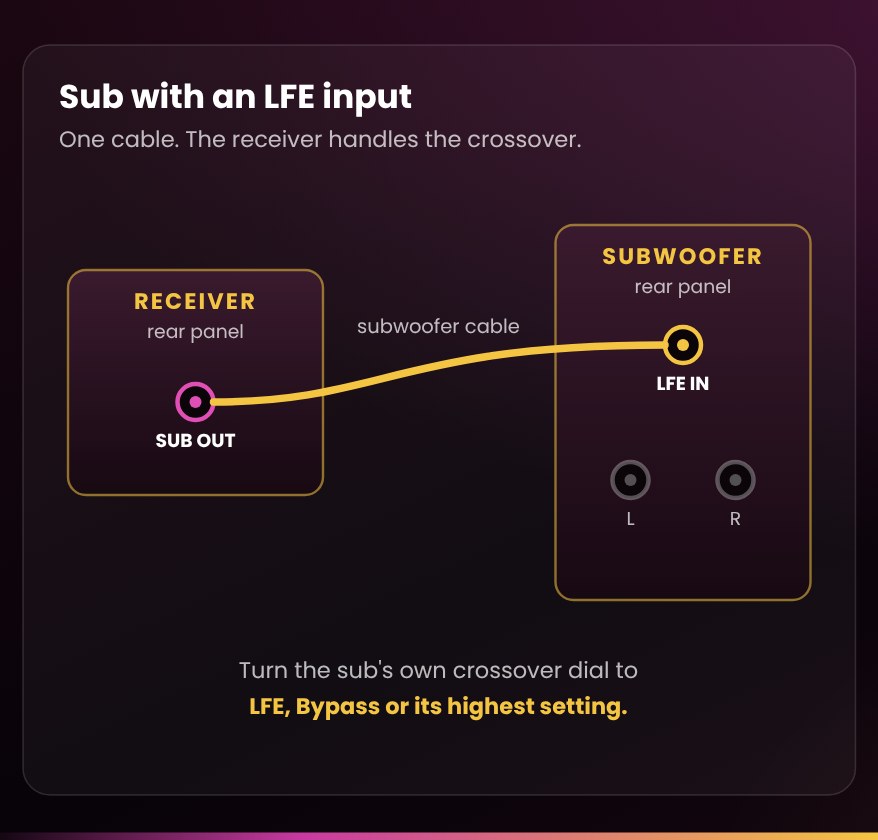
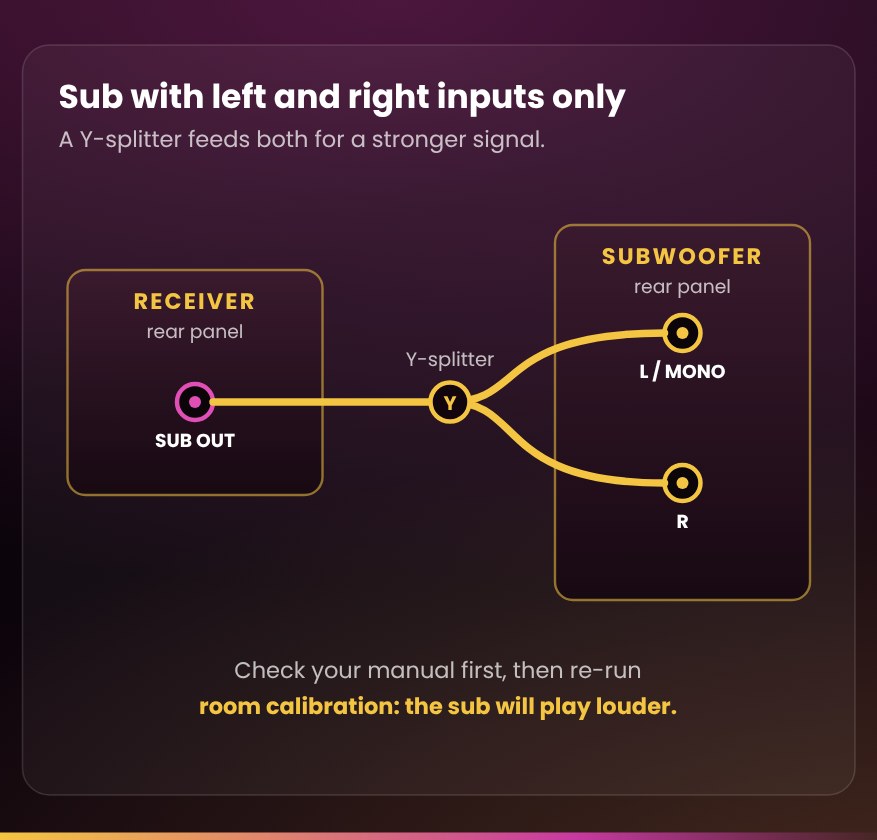
With a home-theatre receiver, run its subwoofer output to the sub’s LFE input if it has one. The receiver then handles the crossover, and the sub’s own crossover dial is bypassed on that input. If your sub only has left and right inputs, use the one marked L, Mono or LFE, or better, a Y-splitter into both (below).
Use a well-shielded subwoofer cable
A subwoofer cable carries a tiny signal over a long run, and on an RCA connection shielding is the only defence against noise. A long, thinly shielded cable can act as an antenna and pull radio interference and hum into the most sensitive input in your system. Keep it away from power cords: run alongside one, it picks up hum, so cross them at right angles instead.
Our Gold Series Subwoofer Cable is built for exactly this job, a quiet run to your subwoofer:
- Dual-shielded, six-layer construction. Aluminum foil plus a 128-strand braided copper shield keep long runs free of hum.
- Dual degaussing rings for extra protection against magnetic interference near power cords and gear.
- Slim gold-plated RCA plugs in narrow alloy jackets that fit crowded receiver back panels.
- Four lengths, 2, 3, 5 and 10 m, so the sub can go where it sounds best, not where the cable reaches.
- A flexible gold cotton mesh jacket that routes behind a rack without kinks, and our 1-year warranty.
Using both inputs with a Y-splitter
Many subs with left and right inputs add the two together inside. Feed the same signal into both and the sub sees a stronger signal: up to 6 dB more voltage, typically worth about 3 dB of output, depending on the design. That’s a meaningful gain, and it brings two practical benefits. The sub’s own level can sit lower, and an Auto power circuit that keeps dozing off wakes up reliably. Two cautions: check your manual first, since some subs want only one input, and re-run your receiver’s room calibration afterwards because the sub will now play louder. Our Gold Series Subwoofer Y-Splitter is made for exactly this.
Hearing hum or buzz?
-
Unplug the subwoofer cable at the sub. If the hum stops, it’s arriving through the cable; if it carries on, it’s in the power or the sub itself.
-
Plug the sub into the same power bar as your receiver. A sub on a different outlet or circuit is the most common cause of ground-loop hum.
-
Re-route the subwoofer cable away from power cords, or try a shorter, better-shielded cable.
-
Never defeat the ground pin on a power cord to cure hum; it is dangerous. Call us instead.
Adding a powered sub to a vintage receiver or amp with no sub out
Most amplifiers built before subwoofers caught on have no sub output, and neither does our RA-Mini. There are three good ways in, in this order:
-
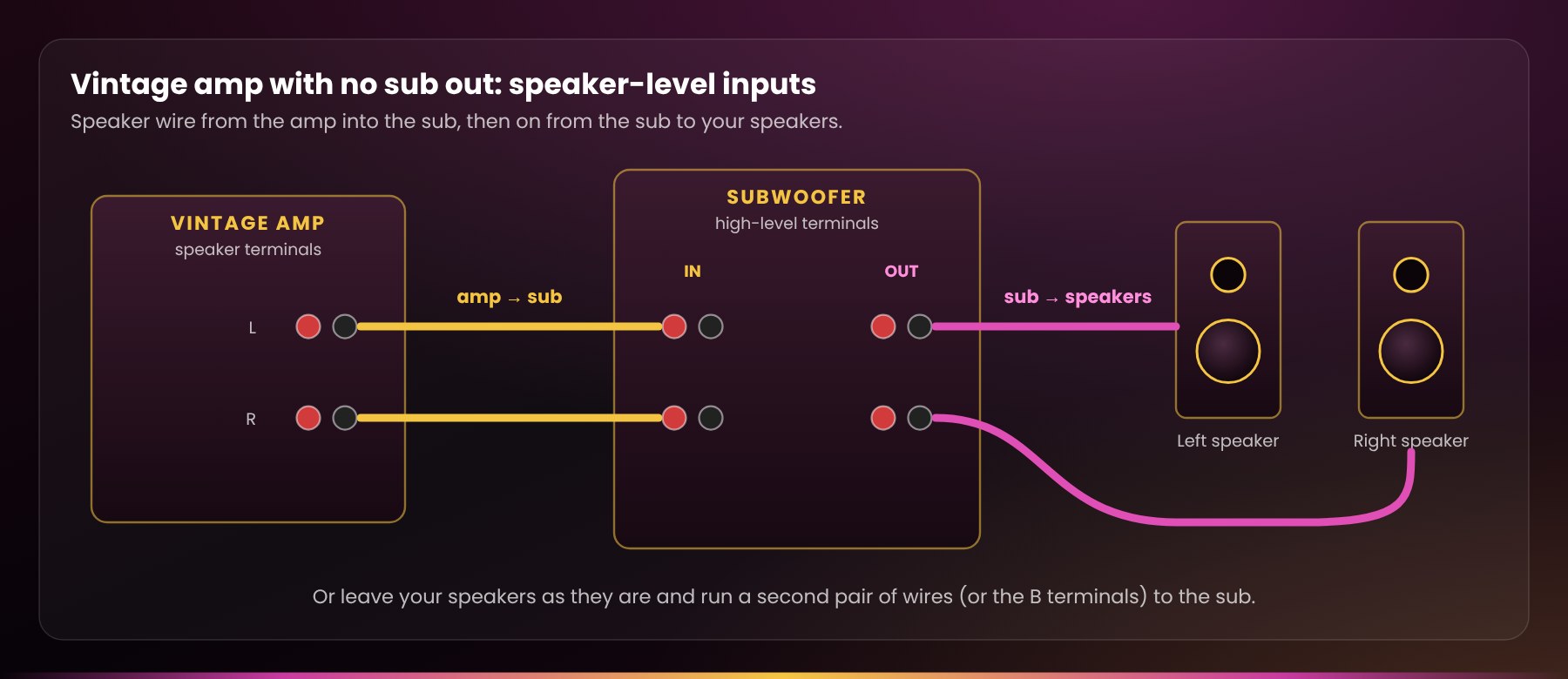
Speaker-level (high-level) inputs. Run speaker wire from your amp’s speaker terminals into the sub’s high-level inputs, then from the sub’s high-level outputs on to your speakers. It’s the method in our Short Audio Tip #8. Alternatively, run a second pair of wires from the amp, or its B terminals, to the sub’s high-level inputs and leave your speakers wired as they are; those inputs draw almost no power from the amp.
-
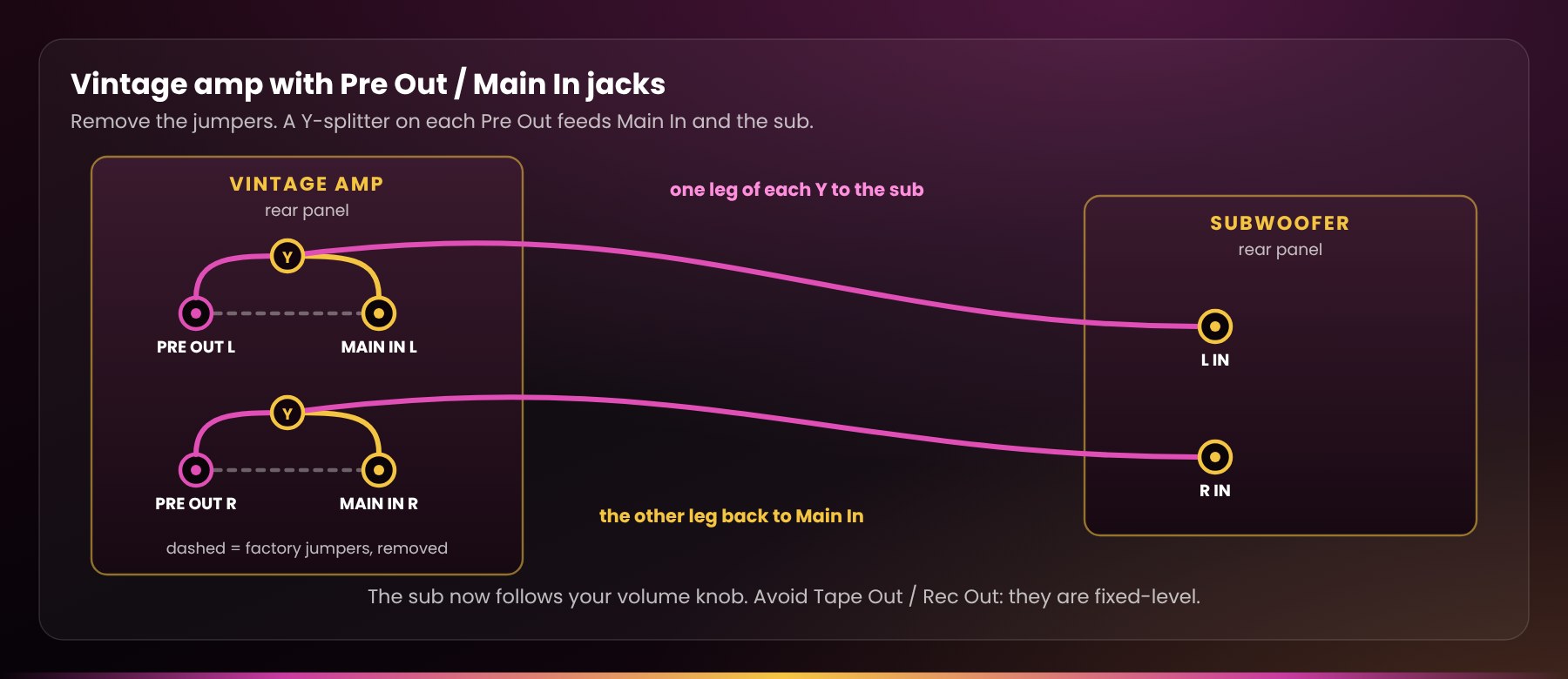
Pre-out / main-in. If your amp has short metal jumpers joining Pre Out to Main In, remove them and fit an RCA Y-splitter on each pre-out: one leg goes back into Main In, the other to the sub’s left or right input. The sub then follows your volume knob.
-
Avoid Tape Out / Rec Out. Those outputs are fixed-level, so the sub won’t follow your volume control and the bass balance changes every time you turn it up or down.
With any of these, set the sub’s crossover (low-pass) dial near the point where your speakers’ bass starts to fade, then fine-tune it as described next. Not sure what your sub or amp offers? Send us the model numbers and we’ll tell you the best way to connect them.
Audio Tip #8: how do you add a subwoofer to an amp with no sub out?
Dialing it in
Treat the level knob on the sub as “set and forget”, not as a volume control
We recommend setting it no higher than about 40% (roughly 11 o’clock) and leaving it there. A gain knob near maximum is the most common way we see subs overdriven: every extra 3 dB of bass asks the amplifier for twice the power, and a loud movie scene can push it into distortion before you notice.
Want more bass? Turn it up at the receiver, not on the sub
After setup, make level changes with your receiver’s subwoofer level (often called subwoofer trim or channel level), a few dB at a time. You keep a known reference point to come back to, the sub’s own gain stays low, and with it the background hiss and the risk of a full-blast surprise. Two limits keep this healthy:
- If room calibration sets the subwoofer level to its lowest value (often −12 dB), the sub’s gain is set too high. Turn the knob down a little and run calibration again.
- Don’t push the receiver’s subwoofer level far into positive numbers either; it is better to sit a few dB below zero than well above it, where the receiver’s output can distort.
Crossover: let one device do the job
- With a home-theatre receiver: set your speakers to Small in the speaker setup menu, and set the crossover about 10–15 Hz above the speakers’ rated bass extension; 80 Hz suits most bookshelf and smaller tower speakers. Then turn the sub’s own crossover dial to LFE, Bypass or its highest setting so the receiver handles bass management. Two crossovers stacked on top of each other leave a hole in the bass.
- With a stereo amp (no bass management): the sub’s crossover dial does the blending. Start with it at the frequency where your speakers’ bass begins to fade, the −3 dB point in their specifications, and adjust by ear. Most people set it far too high; the sub should fill in beneath your speakers, not talk over them.
Phase: pick the setting that’s louder at your seat
The phase control lines up the timing of the sub’s bass with your speakers’ around the crossover point. Sit in your usual seat, play something with steady bass (or a test tone at your crossover frequency), and have someone flip the switch between 0 and 180°. Keep whichever is louder and fuller where you sit. With a variable phase knob, sweep it slowly and stop where the bass is strongest. If you can’t hear a difference, leave it at 0.
Run room calibration last, and again after any move
Once the sub is placed, its crossover dial set and its phase at 0 (or your chosen setting), run your receiver’s automatic setup (Audyssey, YPAO, MCACC, Dirac and so on). SVS’s own manuals say to re-run setup whenever the sub moves.
Placement and the room
Your room is half of your subwoofer
Bass waves are long: a 40 Hz note is about 28 feet from crest to crest, as big as the room itself. They bounce between the walls, floor and ceiling and pile up into standing waves: spots where certain notes boom and spots where they almost vanish. That’s why bass can sound great from the couch and thin from the chair beside it, and why a single sub can only be optimized for one seat.
Start near the front, then do the “sub crawl”
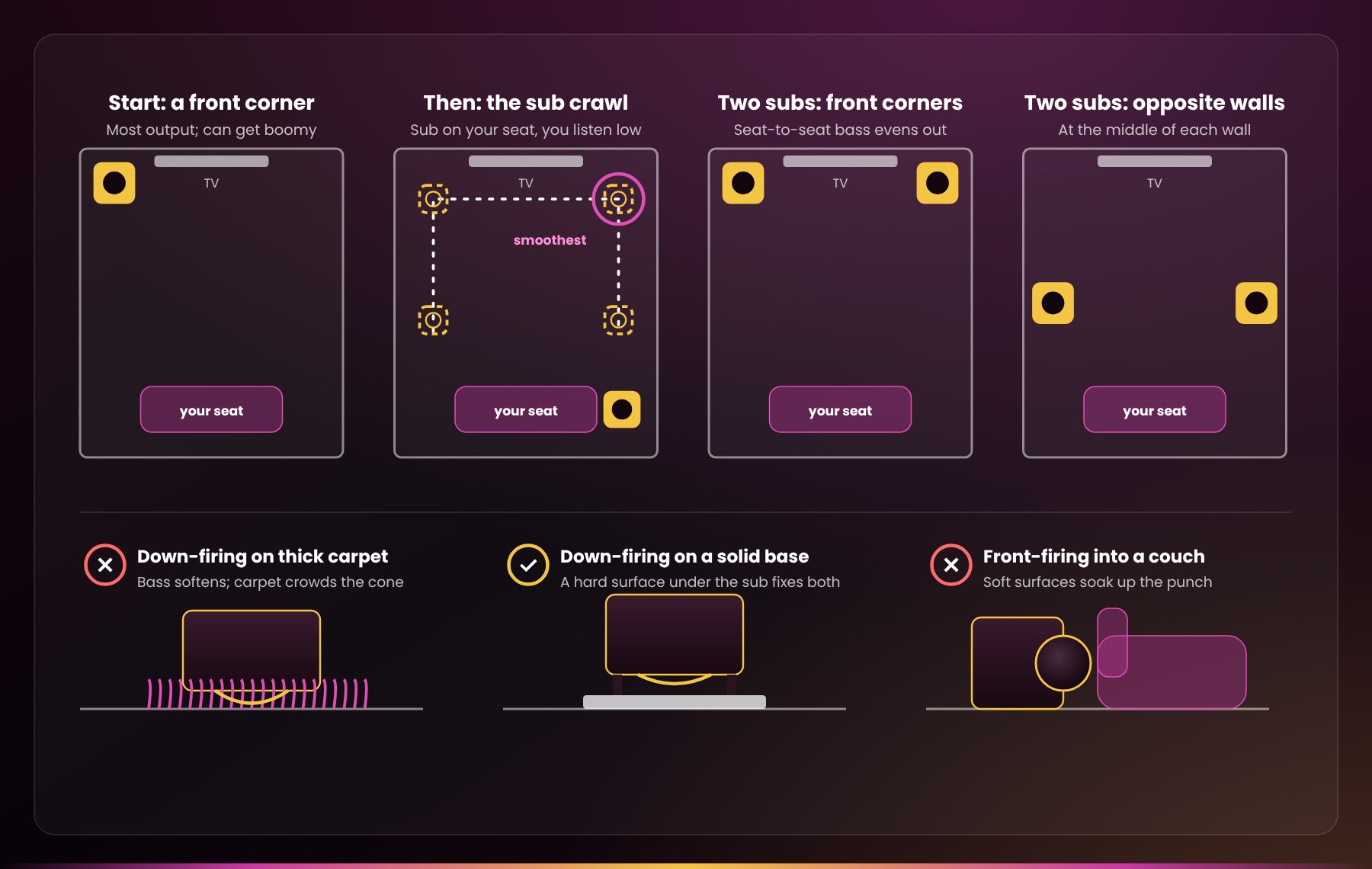
SVS suggests trying a front corner first: it gives the most output, though in some rooms it gets boomy. To find the best spot in your room:
-
Put the subwoofer where you normally sit.
-
Play music with a steady, repeating bass line.
-
Crawl around the places the sub could actually go, with your head near floor level.
-
Where the bass sounds smoothest and fullest, not just loudest, is where the sub belongs.
Inches matter, so try a few spots near the winner, then run room calibration. Keeping the sub near the front speakers also helps the bass stay anchored to the picture.
Bass is volumetric: match the sub to the room
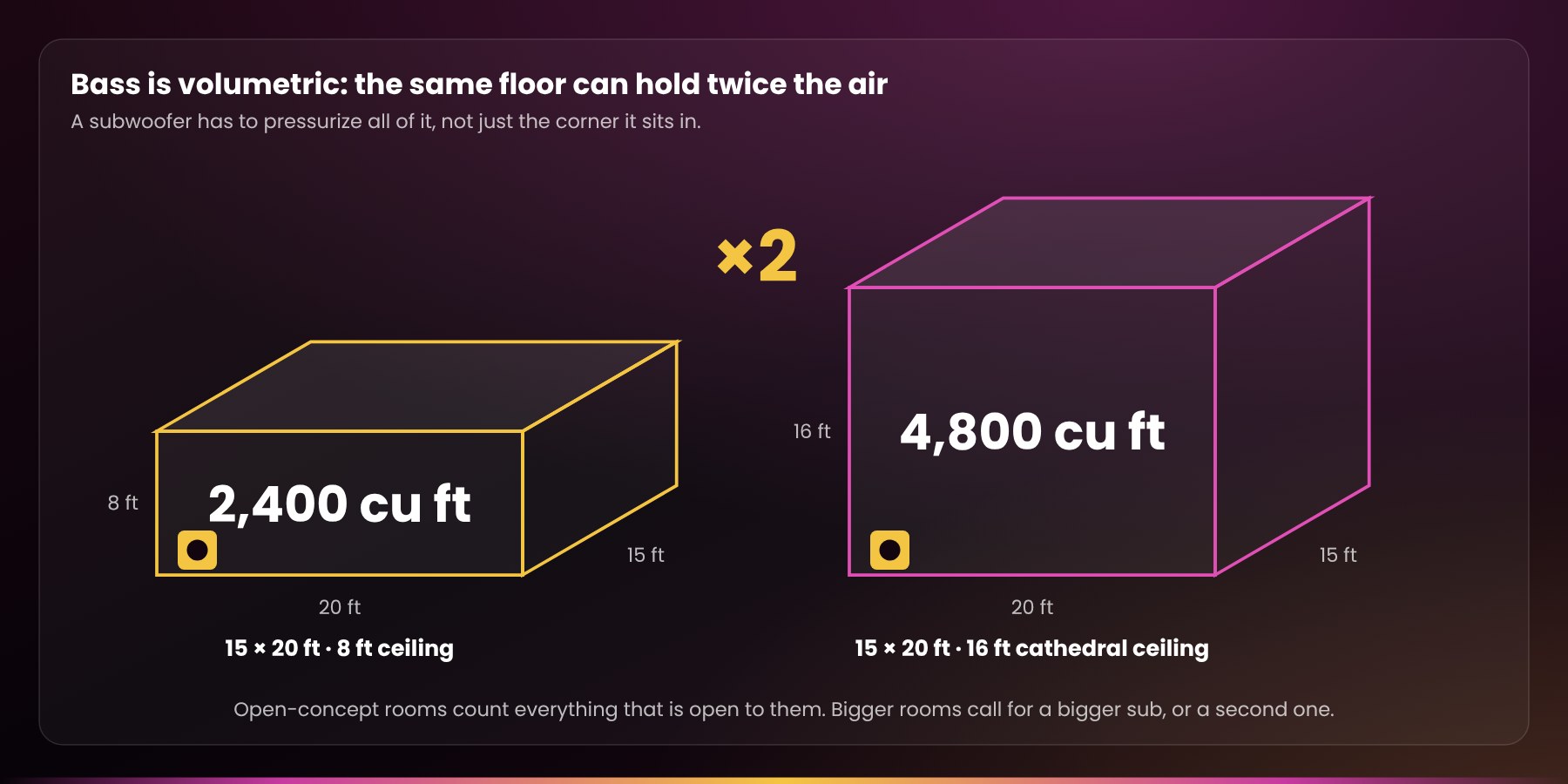
A subwoofer has to pressurize all the air in the space, not just the corner it sits in. A 15 × 20 ft room with an 8 ft ceiling holds 2,400 cubic feet of air; give the same floor a 16 ft cathedral ceiling and it doubles to 4,800. Open-concept rooms count everything that’s open to them. A 10″ sub that’s plenty in a den can strain in a great room, so larger rooms, especially with high ceilings, call for a bigger, more powerful sub or a second one.
Two medium subs often beat one big one
Harman’s research found that multiple subwoofers reduce seat-to-seat variation significantly, and that several smaller subs give more consistent coverage than one large one. Two subs also share the work, so neither runs as hard. Good spots to try for two: the two front corners, or the middle of opposite walls.
Down-firing subs
the cone faces the floor, and the feet set the gap it needs. On thick, plush carpet the bass can soften, and the carpet must never touch or crowd the cone. A solid, hard base under the sub fixes both problems. With downstairs neighbours, a down-firing sub on a bare floor pushes bass straight into the structure; an isolation platform makes the biggest difference there (below).
Front-firing subs
don’t aim the cone into a couch, drapes or a stack of cushions, and don’t tuck the sub inside a closed cabinet. Soft surfaces soak up the punch, furniture can rattle, and the amplifier on the back needs air.
Room treatment: thin panels won’t touch the bass
Thin foam or fabric panels tame echo, but they leave the low end untouched. Real bass traps are thick, 4 inches or more, and go in the corners, where bass pressure builds up most. Start with the front corners, then the wall-to-ceiling corners. They tighten up boomy notes and help the bass sound even around the room.
Isolation: tighter bass, fewer rattles, happier neighbours
Decoupling the sub from the floor stops the floor itself from booming along, which tightens the bass in your room and cuts down what travels through to the rooms around and below you. We carry IsoAcoustics’ sub-specific stands, the Aperta Sub and Aperta Sub XL, plus GAIA isolators with GAIA carpet discs for carpeted floors. Tell us your sub’s model and weight and we’ll match the right one.
Everyday care and warning signs
Let it breathe, and keep it dry
On most powered subs, the metal panel on the back is the amplifier’s heat sink. It can reach about 60 °C, so keep it at least 2 inches from the wall with nothing touching it. Keep the sub away from heat registers, radiators and baseboard heaters, and out of closed cabinets unless it’s designed for one.
Keep it well away from humidifiers
Warm, moist air blowing over a sub works its way into the amplifier’s electronics and connections and wears on the driver’s cone and surround. We’ve seen subwoofers and other components age five years in a few months, just from spending one winter next to a humidifier. Put the humidifier on the other side of the room and point it away from your gear.
Brought it home through a Canadian winter?
Let it sit at room temperature for a few hours before you plug it in, so any condensation inside can dry off first.
Keep the top clear
No drinks, plants or vases on the cabinet: liquid and an amplifier don’t mix, and anything sitting on top will buzz and rattle.
Grille on, hands off the cone
Keep the grille on if you have pets or small children. Dust the cabinet with a soft, dry cloth, never spray cleaner near the cone or controls, and never push on the cone.
Moving it?
Power it down and unplug everything first. Lift by the cabinet, never by the cone, the port or the amplifier panel, and never set a down-firing sub down on its driver.
Sounds that mean “turn it down now”
- A sharp clack, slap or knock on deep notes is the driver bottoming out: the moving parts hitting their limits. Turn it down right away; repeated, it will ruin the driver.
- Crackling, fuzzy or distorted bass at volumes that used to be clean.
- The sub cutting out by itself at high volume. Many subs shut down to protect an overheating amplifier.
- A new hum or buzz with nothing playing (see Connecting it).
If any of these keep happening at normal listening levels, stop using the sub and contact us. Please don’t open the amplifier panel: there are no user-serviceable parts inside, and it can give an electrical shock. That’s exactly what our bench and our warranty are for.
Your subwoofer warranty, and why it’s different
Almost everything used that we sell carries our 90-day Bumper-to-Bumper Warranty: if it fails in normal use, we repair or replace it at our expense and start you on a fresh 90 days. Used subwoofers are the one exception, and everything in this guide is the reason why.
What you get
Used subwoofers carry a 90-day limited warranty with a 50% deductible. If your sub needs repair or replacement under warranty, you contribute half of what you paid for it and we cover the rest. Subwoofers aren’t eligible for our Extended Warranties.
Why subs are different
A subwoofer is the most fragile, most failure-prone and most misunderstood part of a system, and the component most often over-driven. It happens fast and quietly: a gain knob left near maximum, a cable plugged in hot, one movie night that ran too loud. A sub can be damaged in minutes, and from the outside the damage usually doesn’t show. Our warranty covers a component that fails on its own in normal use. Normal use is everyday listening, not a lightning strike, a hot-plug mishap, a coffee incident or an encounter with gravity.
Your best protection is this guide
The habits in it are what give a sub a long, trouble-free life, and they protect your warranty too.
- Picking up in person? Let us set the sub up and audition it for you, so you see and hear it working before it goes home.
- Bought in person or on Kijiji, Facebook Marketplace or Canuck Audio Mart? Send one email to sales@radique.com to register your purchase. Orders placed on radique.com are already on file.
- Bought a new special-order sub? It’s covered by us for 30 days, then directly by the manufacturer.
Watch and learn
Prefer to watch? Mark and La-Donna cover a lot of this on the Radique Audio YouTube channel.
Setting up
- How Do You Add a Subwoofer to an Amp With No Sub Out? (Audio Tip #8): speaker-level connections for vintage amps and our RA-Mini.
- What Order Do You Turn On Stereo Equipment? (Audio Tip #7): connect with everything off, use a switched power bar, and power up in the right order. Your sub goes on last and off first.
- Tiny But Mighty! The Radique Audio RA-Mini Amp: our palm-sized amp, which pairs nicely with a sub through speaker-level inputs.
Getting the sound right
- Is a Louder Speaker a Better Speaker? (The Loudness Trap): why louder fools our ears into hearing “better”. It’s the same reason a sub turned up too far seems great for a week and tiring after that.
- What Does the Loudness Button Do? (Audio Tip #5): why bass seems to vanish at low volume, and what to do about it.
- Why Can’t I Hear the Dialogue in Movies?: if a big new sub makes dialogue harder to follow, the center channel is usually the fix, not turning the sub down.
Isolation and the bigger picture
- Small Channel, Big Day: Our IsoAcoustics Launch (Lost Videos #1): the day we started carrying IsoAcoustics, the isolation products recommended above.
- Budget Bookshelf Speaker Showdown II: the full-length episode Audio Tip #8 comes from.
Coming soon: Audio Tip #9, on choosing speakers to pair with a subwoofer. Subscribe so you don’t miss it.
Subwoofer questions we hear most
Short answers, each one taken from the guide above.
How high should I set my subwoofer’s volume (gain) knob?
No higher than about 40%, roughly 11 o’clock, and leave it there. Treat the level knob on the sub as “set and forget”, not as a volume control. A gain knob near maximum is the most common way we see subs overdriven. If you want more bass, turn it up with your receiver’s subwoofer level instead, a few dB at a time.
Is it safe to plug in a subwoofer cable with the power on?
No. Plugging a cable into a live subwoofer or receiver sends a loud thump through the system that can damage the amplifier or the driver. Turn everything off first, ideally with the switch on your power bar, make every connection, then power up.
Does a surge protector protect my subwoofer from brownouts?
No. A surge protector absorbs spikes, including the surge that can hit when power returns after an outage or brownout, but it does not protect against the brownout itself. When the lights dim or a storm rolls in, switch the system off at the bar or unplug it. If brownouts are common where you live, look for a power conditioner with automatic low- and high-voltage shutdown.
What crossover setting should I use for my subwoofer?
With a home-theatre receiver, set your speakers to Small and set the crossover about 10–15 Hz above the speakers’ rated bass extension; 80 Hz suits most bookshelf and smaller tower speakers. Then turn the sub’s own crossover dial to LFE, Bypass or its highest setting, because two crossovers stacked on top of each other leave a hole in the bass. With a stereo amp, start the sub’s dial at the frequency where your speakers’ bass begins to fade, and adjust by ear.
What does the phase switch on a subwoofer do?
It lines up the timing of the sub’s bass with your speakers’ around the crossover point. Sit in your usual seat, play something with steady bass, and have someone flip the switch between 0 and 180°. Keep whichever is louder and fuller where you sit. If you can’t hear a difference, leave it at 0.
Where is the best place to put a subwoofer?
Try a front corner first: it gives the most output, though in some rooms it gets boomy. To find the best spot in your room, do the “sub crawl”: put the subwoofer where you normally sit, play music with a steady, repeating bass line, and crawl around the places the sub could actually go, with your head near floor level. Where the bass sounds smoothest and fullest, not just loudest, is where the sub belongs.
Are two subwoofers better than one?
Often, yes. Harman’s research found that multiple subwoofers reduce seat-to-seat variation significantly, and that several smaller subs give more consistent coverage than one large one. Two subs also share the work, so neither runs as hard. Good spots to try for two: the two front corners, or the middle of opposite walls.
Can I put a down-firing subwoofer on carpet?
On thick, plush carpet the bass can soften, and the carpet must never touch or crowd the cone. A solid, hard base under the sub fixes both problems.
How do I connect a subwoofer to a vintage receiver with no sub out?
Use the sub’s speaker-level (high-level) inputs: run speaker wire from your amp’s speaker terminals into the sub’s high-level inputs, then from the sub’s high-level outputs on to your speakers. If your amp has short metal jumpers joining Pre Out to Main In, you can remove them and fit an RCA Y-splitter on each pre-out instead. Avoid Tape Out and Rec Out: those outputs are fixed-level, so the sub won’t follow your volume control.
Should I use one or both inputs on my subwoofer?
With a home-theatre receiver, run its subwoofer output to the sub’s LFE input if it has one. If your sub only has left and right inputs, use the one marked L, Mono or LFE, or better, a Y-splitter into both. Many subs add the two together inside, so the sub sees a stronger signal and an Auto power circuit that keeps dozing off wakes up reliably. Check your manual first, since some subs want only one input, and re-run your receiver’s room calibration afterwards.
Why is my subwoofer humming?
Unplug the subwoofer cable at the sub. If the hum stops, it’s arriving through the cable; if it carries on, it’s in the power or the sub itself. Plug the sub into the same power bar as your receiver, because a sub on a different outlet or circuit is the most common cause of ground-loop hum, and re-route the subwoofer cable away from power cords. Never defeat the ground pin on a power cord to cure hum; it is dangerous.
Should I leave my subwoofer on Auto, or turn it off?
Auto is convenient and saves power: the sub wakes when it detects a signal and drops to standby after a quiet spell. Standby still draws power, though, and it leaves the amplifier connected to every spike on the line. If you’re going away for a few days, switch it fully off at the sub or the power bar.
What warranty comes with a used subwoofer from Radique?
Used subwoofers carry a 90-day limited warranty with a 50% deductible: if your sub needs repair or replacement under warranty, you contribute half of what you paid for it and we cover the rest. Subwoofers aren’t eligible for our Extended Warranties. A new special-order sub is covered by us for 30 days, then directly by the manufacturer. The full terms are in our Warranty FAQ.
Quick checklist
If you only read one part of this guide, read this one.
- Never connect it hot. Switch everything off before you plug or unplug any cable. Turn the sub on last and off first.
- Protect its power. Plug it into a good surge-protecting power bar, or put the whole system behind a power conditioner like our Ultralink HDC150. Surge protection doesn’t cover brownouts, so when the lights dim, switch off.
- Keep the gain knob below about 40%. Get extra level from your receiver’s subwoofer setting instead.
- Blend, don’t boom. Set your speakers to “Small”, let the receiver handle the crossover, and turn the sub’s own crossover to LFE or its highest setting. With a stereo amp, set the sub’s crossover near where your speakers run out of bass.
- Use a shielded subwoofer cable, kept away from power cords. Try the Y-splitter if your sub has left and right inputs.
- Place it for the room. Start in a corner and do the “sub crawl”. Down-firing subs belong on a hard surface, and nothing soft should sit in front of a front-firing driver. Big rooms do best with two subs.
- Set the phase to whichever position sounds louder and fuller at your seat. Then re-run your receiver’s room calibration.
- Let it breathe, and keep it dry. Leave 2 inches or more behind the amplifier panel, keep it off rugs and sofas, and keep it away from heaters and humidifiers.
- Listen for trouble. A clack, slap or crackle means turn it down now.
- Turn it fully off when you’ll be away for more than a few days.
- Know your warranty. Used subs carry a 90-day limited warranty with a 50% deductible, for failures in normal use. A hot-plug mishap or a lightning strike isn’t normal use, so the habits above protect your warranty too.
Questions, odd noises, or want a hand dialing it in?
Get in touch. We’re happy to help, and we’d much rather hear from you early.
More from Radique: Warranty FAQ · turntable connectivity · banana plug installation